
Workout Library
Last updated: 2026-05-07
Your Trainer is a multi-rider indoor cycling app for Android tablets. Smart-trainer control with local data + local control. One-time purchase.
Your Trainer ships with a bundled library across the main training-stimulus categories — pick a session and ride. Beyond the bundled set you can browse and install workouts from the online library inline, sync planned workouts and your personal library from intervals.icu, import community workouts, generate one from the AI Workout Coach, or hand-author from the workout schema.
Sources of workouts
The library draws from four sources, all surfacing on the same workout-selection screen:
- Bundled — workouts that ship with the app. Names and descriptions are localised to each supported language, and they cover the main interval shapes for both Power and HR-Zone training. Bundled workouts re-appear automatically after a reinstall.
- Online library — 300+ curated structured workouts, browsable and installable inline. Tap a workout to preview; tap the Download button to install it. Detail below at Online library. Pro / Family.
- intervals.icu integration — planned workouts on your intervals.icu calendar and your intervals.icu personal library appear inline alongside the bundled and online sets. Detail below at intervals.icu integration. Pro / Family.
- Imported — workouts you've added:
.ytwfiles from this site or from friends,.zwoimports from Zwift, and the workouts you've created with the visual editor or the AI Workout Coach. Imported workouts live in your rider's database; they survive across launches but get wiped on uninstall (use per-rider export to preserve them).
Online library — browse and install inline
An online library of 300+ structured workouts is available directly on the workout-selection screen — no separate download or import step. The sticky Online Library section sits inside the regular tab; tap a workout to preview, tap the small Download button on the left of the row to install it into your local set. Once installed, the workout shows up alongside the bundled ones and you ride it the same way.
At release the online library carries 280 Power workouts and 34 HR-Zone workouts, each in 9 languages, with more added in waves. The catalogue lives on the website too — see the curated workout library for the full browse + pack-builder view.
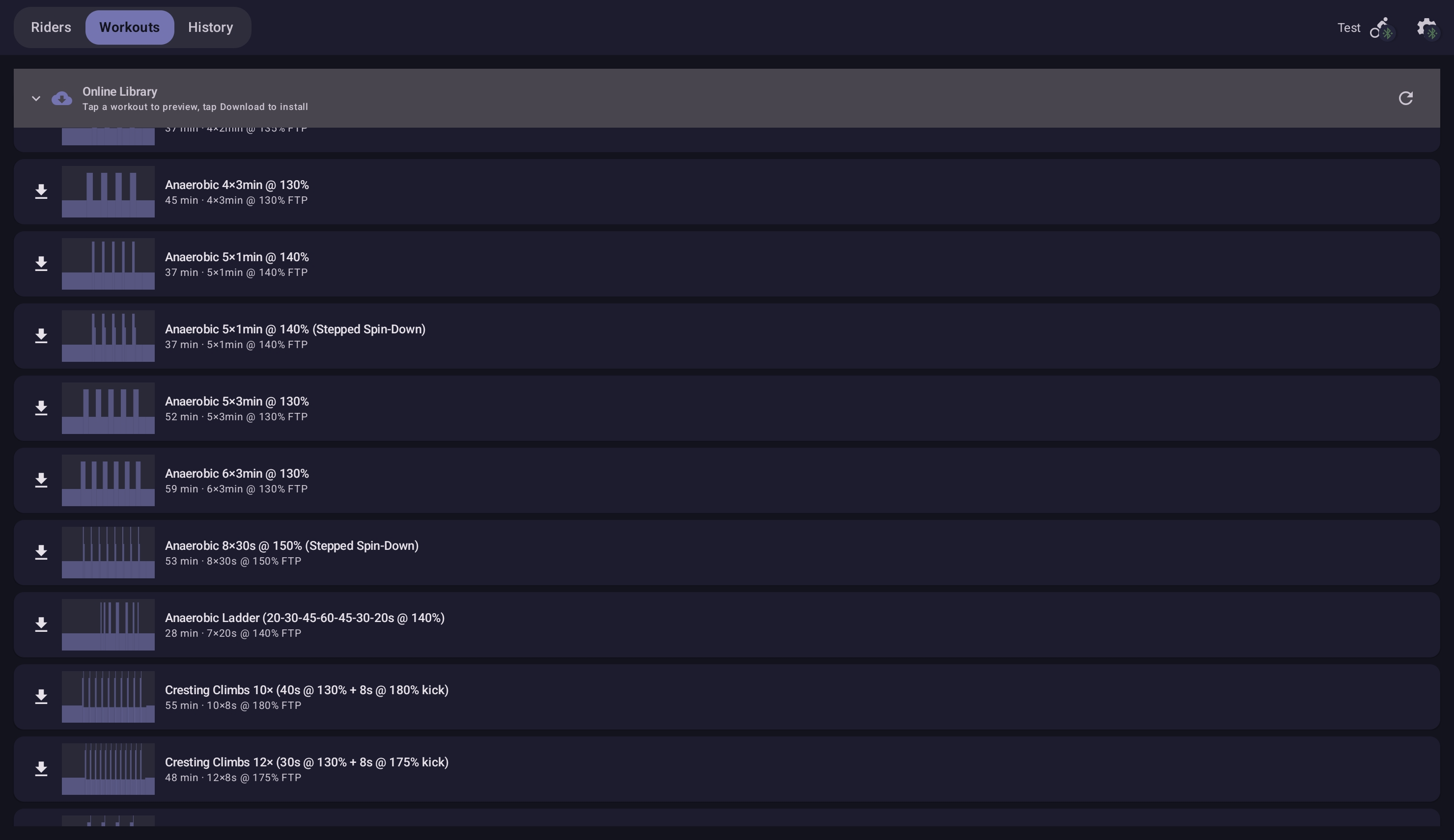
Online Library is a Pro / Family feature; FREE riders see the section in preview mode (tap to see a description) but installing requires Pro / Family.
intervals.icu integration
intervals.icu is a training-analytics platform built by a small team led by David Tinker. Connecting an account lets Your Trainer surface your planned workouts and your personal library inline on the workout-selection screen, publish workouts back to your intervals.icu calendar, and upload completed rides as FIT files. Pro / Family.
Connecting
Open Profile → Connected and tap the intervals.icu row. The app launches a one-tap browser sign-in. After authorising, the row shows Connected as <your name> and a Sync from intervals.icu sub-row appears. Tap Sync to pull your Max HR, LTHR and FTP from intervals.icu into the active rider profile — empty fields fill, any values you've already set stay. Sync is rider-initiated; nothing runs in the background.
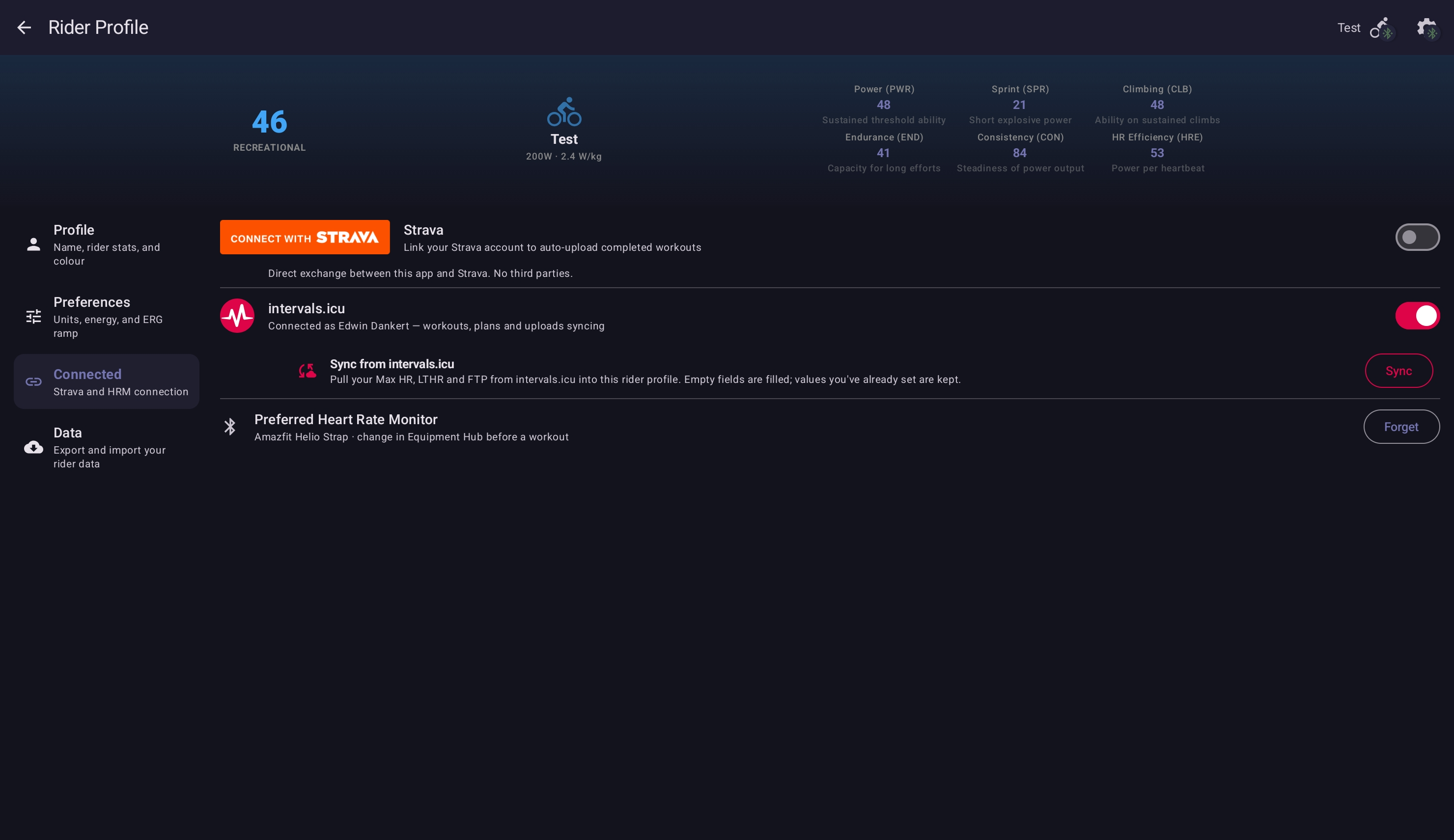
Disconnect any time from the same row. Disconnecting revokes the access token on intervals.icu's side; no workouts are deleted locally.
Today's plan + Coming up
The workout-selection screen gains two intervals.icu sections at the top of the workout list:
- Planned — collapses your intervals.icu calendar for the current week into rows. Today's workouts show as Today's plan entries with the workout name and duration.
- Coming up — the next seven days of planned workouts, each with a small date chip (Tomorrow, day-of-week, or the date for a week out). Workouts that also appear in the regular library are deduplicated.
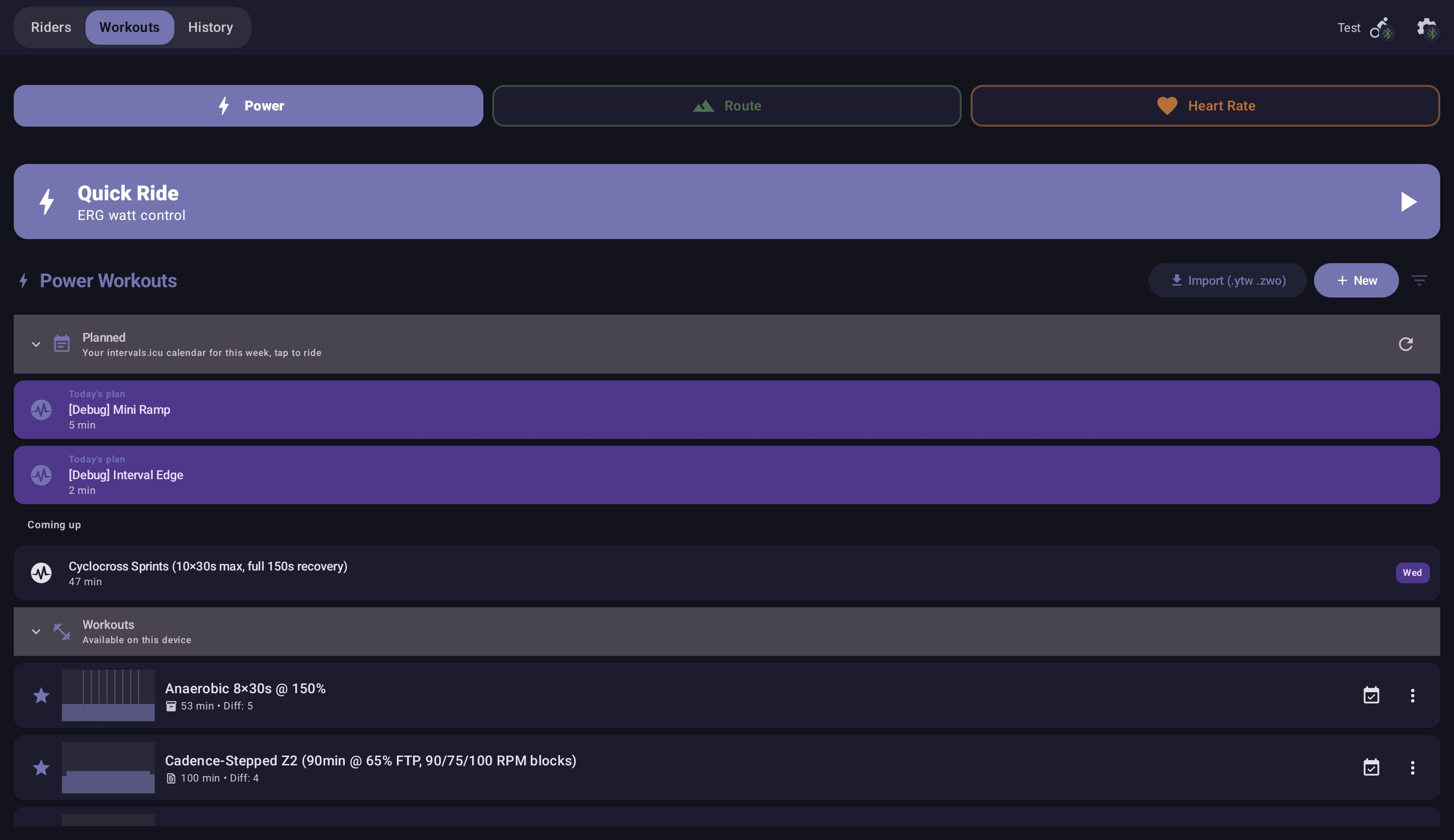
Tap a row to open the workout detail. The cues and structure come from the intervals.icu DSL; cues with offsetSec: 0 fire at the start of the interval and are picked back up if the workout round-trips through intervals.icu.
Plan and Send actions
The kebab menu on any local workout (bundled, online, or imported) shows two intervals.icu actions at the top:
- Plan — drops the workout onto your intervals.icu calendar on a chosen date. The Plan action opens a date picker; pick a day and tap Schedule.
- Send — publishes the workout to your intervals.icu personal library (no calendar date).
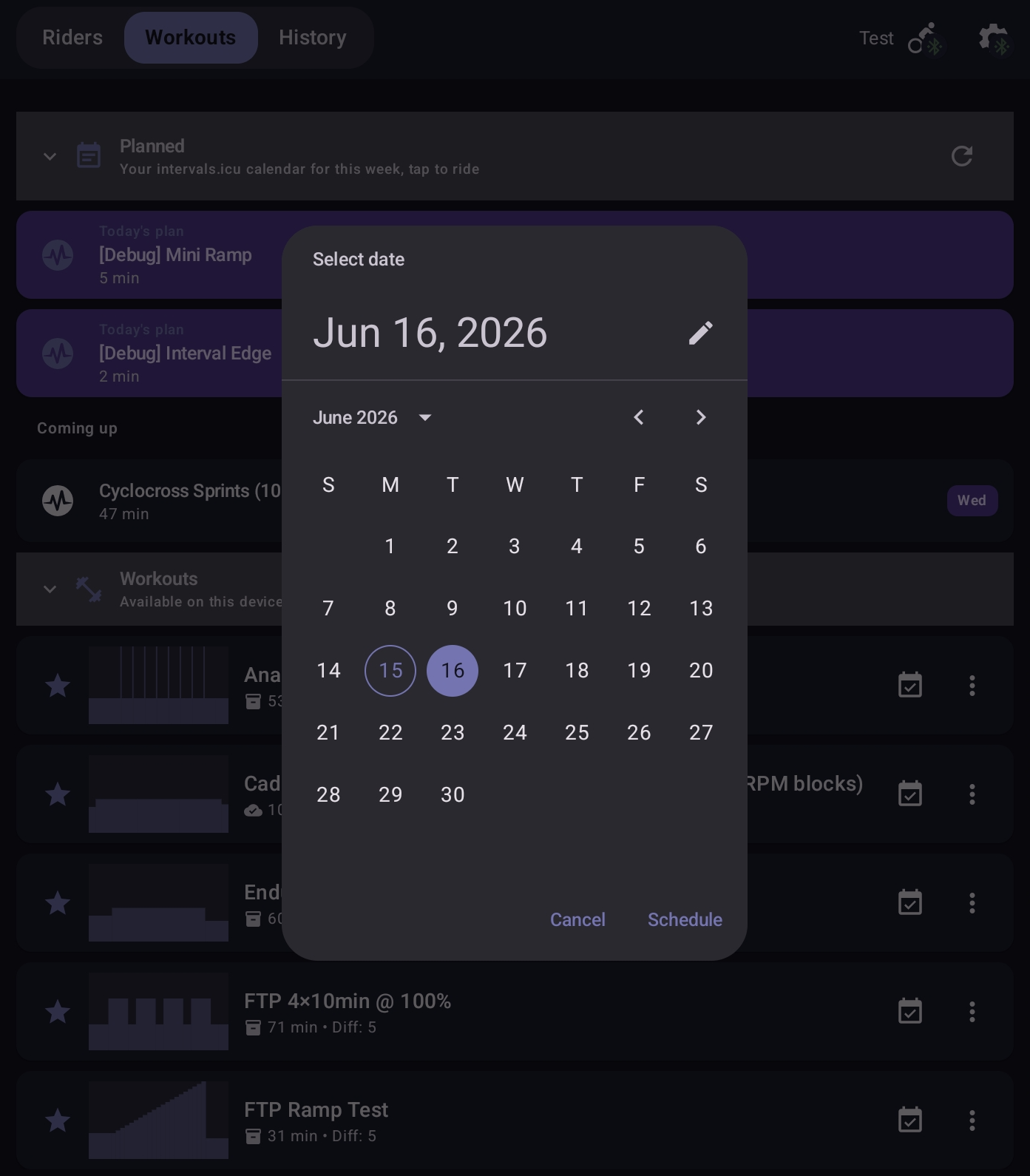
A one-tap Plan affordance (the calendar icon) also sits between the personal-best chip and the kebab on each row, for the common scheduling case without opening the menu.
Completed rides → FIT upload
After a session ends, if intervals.icu is connected the ride uploads as a FIT file automatically. The upload is rider-controllable from Session History — you can re-upload or skip a ride.
LTHR and Max HR
When connected, intervals.icu is the source of truth for LTHR. The Sync from intervals.icu action pulls Max HR, LTHR and FTP into the active rider; the per-keystroke save in the rider profile commits stably without racing the LTHR derivation. See training zones for how the seven HR zones derive from LTHR.
Privacy
The integration sends only the minimum data needed: an OAuth token at connect time, your workout / event identifiers when reading, the FIT file when uploading, and the workout intent when planning or sending. No rider profile data leaves the device beyond what you've explicitly synced. The intervals.icu connection state is rider-scoped — each rider in a multi-rider household has their own connection.
Browsing and filtering
The workout-selection screen has three tabs: Power, Route, and Heart Rate. Each tab lists the bundled and imported workouts of that type, and each tab has an unstructured-ride card at the top — Quick Ride on Power, Free Ride on Route, Zone Ride on Heart Rate. See Quick / Free / Zone Ride for the unstructured modes.
Within each tab you can:
- Filter by duration (under 30 min / 30–45 / 45–60 / 60+) — and on the Route tab, by distance (under 5 km / 5–15 / 15–30 / 30 km+).
- See a small trophy badge on workouts you've completed at least once — that's your personal best indicator.
- Tap a workout to open its detail page with the full interval breakdown and your PB at the top.
How to import a workout
Once a workout file is on your tablet, the simplest path is to share it from your file manager (or Drive, or Gmail) and pick Your Trainer in the share sheet. The app detects the file type, drops it into the right tab, and refreshes the library.
Alternative path: open the relevant tab in the workout-selection screen, tap the import button, and pick the file from local storage.
Accepted file formats
| Tab | Accepts | Notes |
|---|---|---|
| Power | .ytw, .zwo | Native and Zwift workout formats. .zwo is converted to .ytw on import. |
| Heart Rate | .ytw | HR-Zone workouts use the HR_ZONE workout type and target zones rather than wattages. |
| Route | .gpx, .fit, .tcx | Each track point needs an elevation value — see routes guide. |
Base & Endurance
Z2-anchored steady rides for aerobic development — the workouts you do most of the time during a base-building phase. Long, conversational, designed to be repeatable several times a week without leaving you cooked. The AI Workout Coach generates Z2 sessions of any duration if the bundled options don't fit.
Tempo & Sweet Spot
Z3 and low-Z4 intervals — most fitness for the recovery cost. Sweet spot (88–94 % FTP) is the workhorse of mid-volume training plans; tempo (76–87 %) sits a bit below. Sessions typically run 45–90 minutes.
Threshold
Z4 intervals at and around FTP. The classic shapes — 2×20, 4×8, 5×6, over-unders — train your ability to sit at FTP for longer, and ultimately drag FTP itself up.
VO2max
Short Z5 intervals (3–5 minutes typically) for top-end aerobic fitness. 5×3, 5×4, 30/30 microbursts, pyramid sessions. Hard, short, recovery-hungry; once a week is usually plenty.
HR-Zone
Sessions that target heart-rate zones rather than wattage — the trainer adjusts power live to keep your HR in the prescribed zones. The same intensity ladders as the power workouts (Z2 endurance, Z3 tempo, Z4 threshold), anchored to LTHR instead of FTP. Useful when you want to train by feel, when external factors (heat, fatigue, a light cold) make a fixed wattage feel wrong, or when the day's goal is cardiovascular load rather than power output. The Heart Rate tab in the app includes a bundled set of HR-Zone sessions; AI-generated HR-Zone workouts work the same way.
Routes
GPX, FIT, and TCX route files for slope-driven simulation rides. Find a route on RideWithGPS, Komoot, Strava, or Garmin Connect, download the file, and import via the share sheet. Your Trainer follows the elevation profile; you choose the gearing and cadence.
Routes support multi-lap riding — set a lap count at any time, and the cockpit shows the current lap and remaining laps as you go. The routes guide covers multi-lap in depth, including per-lap times and how the Ghost Rider replays your previous best on every lap.
Loop the whole workout
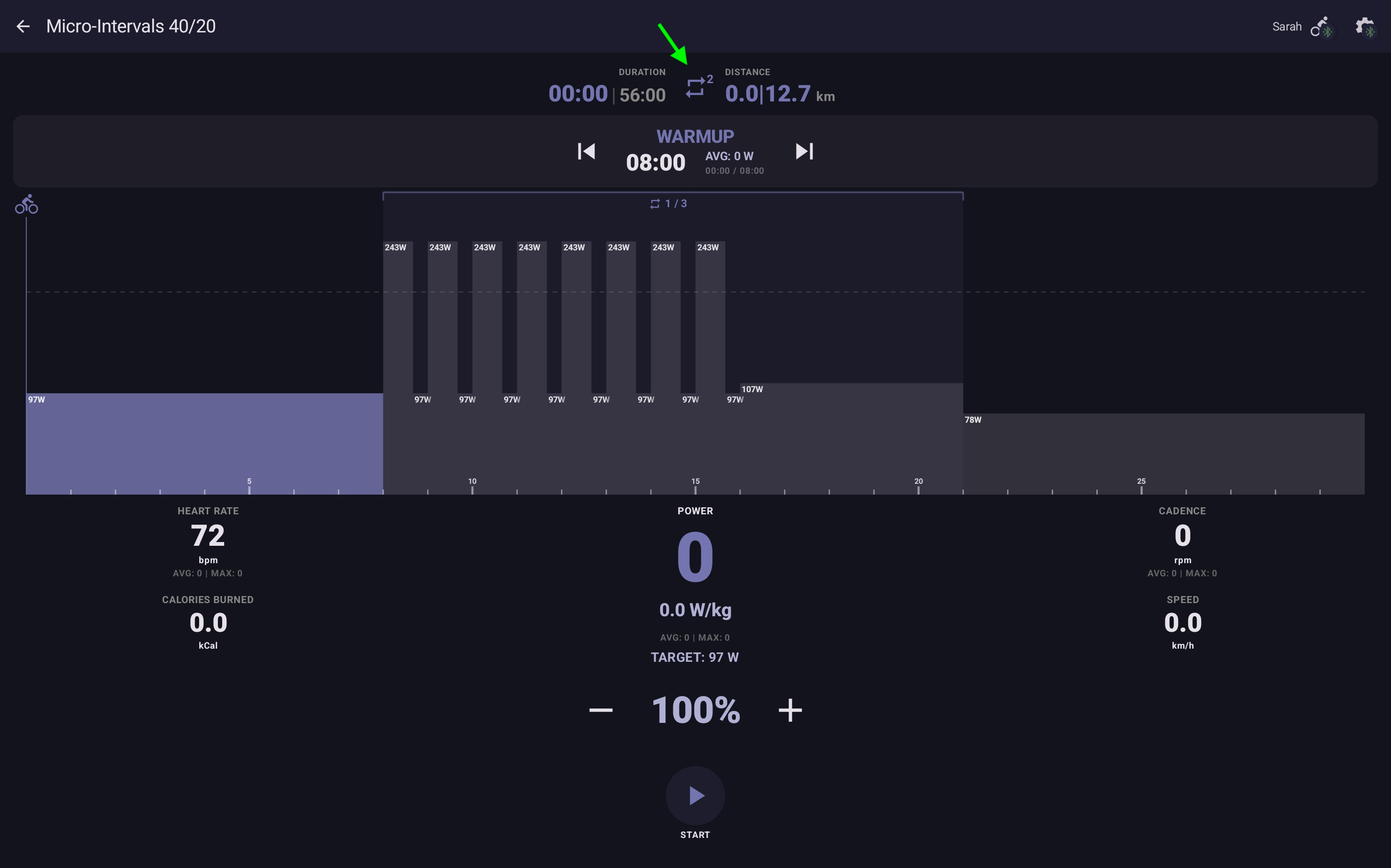
The cockpit has a Repeat button — the workout-side equivalent of multi-lap routes. Tap it during the ride to cycle through extra runs of the main intervals: Off → 1× → 2× → 3× → ∞ → Off. The badge on the button shows the count remaining (or ∞).
What loops is the workout's main interval block. The warm-up runs once at the start, the main intervals replay as many times as the badge says, and the cool-down runs once at the end after the last loop — so a 1× session is warm-up + body + cool-down, and a 3× session is warm-up + body + body + body + cool-down.
Use it when you want to do a favourite 20-minute Sweet Spot session twice for a 40-minute day, or when you're feeling good and want to add one more block on the fly. The setting is toggleable while the main intervals are running.
Quick / Free / Zone Ride (unstructured)
Not in the mood for a structured workout? Each tab has an unstructured-ride card at the top. Quick Ride (Power tab) holds a wattage in ERG; Free Ride (Route tab) gives you slope and virtual gears in Simulation mode; Zone Ride (Heart Rate tab) keeps you in a target HR zone via the HR Zone-Lock thermostat. See Quick / Free / Zone Ride for the full walkthrough.
Build your own
Three paths to a workout that isn't in the library:
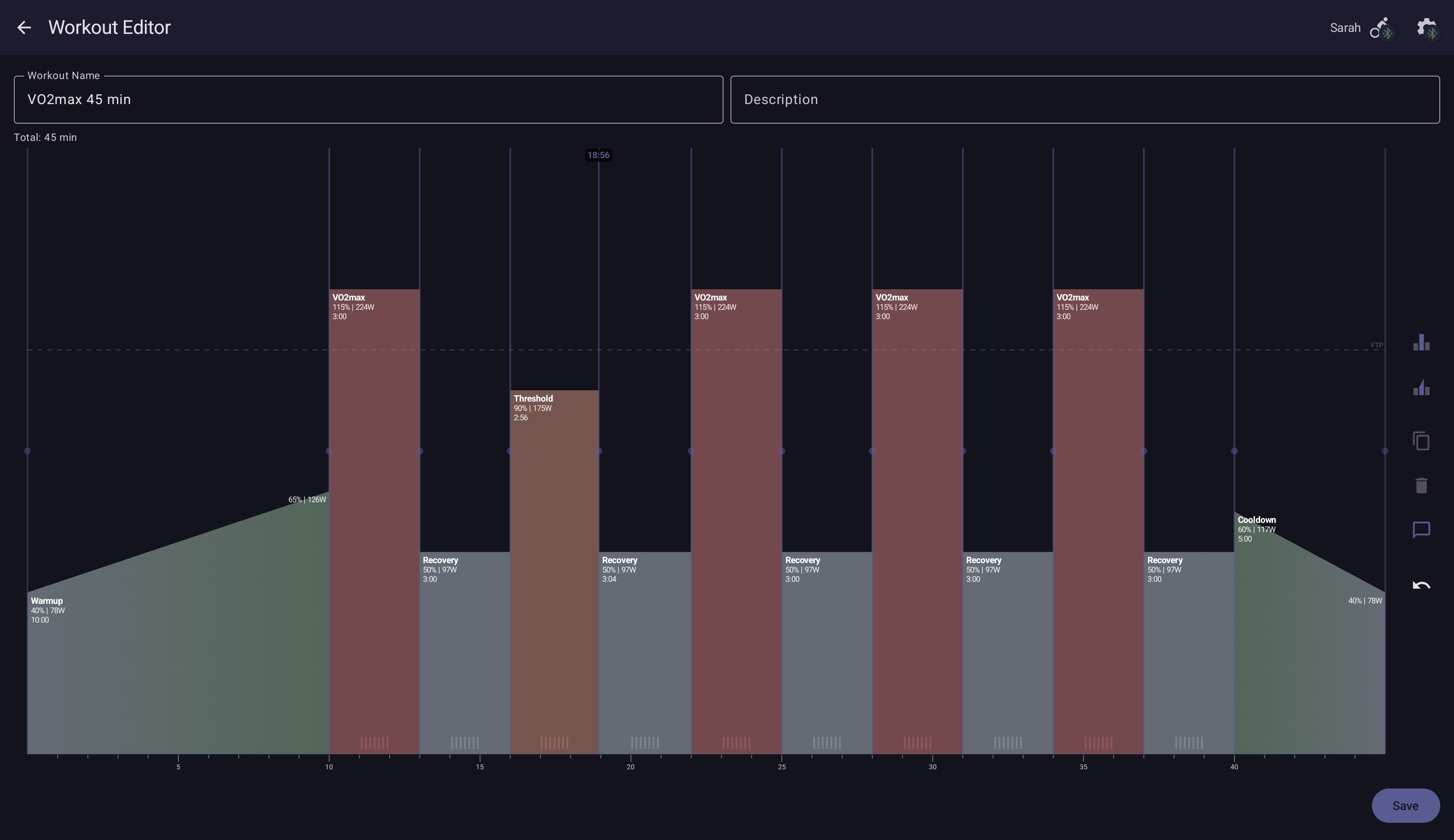
- The visual editor — workout-selection screen → + → drag block heights for power, drag block edges for duration, tap to set labels and coaching cues. Preset templates (Sweet Spot, Threshold, Pyramid, etc.) seed common shapes you can then refine. Best for ad-hoc structures that the bundled options don't cover.
- The AI Workout Coach — describe what you want in plain text, get a structured workout back. Best when you have a goal in mind ("60 minutes of threshold work with two 20-minute intervals at 95 % FTP and a long warm-up") but don't want to click each block.
- Hand-author with the workout schema — write a
.ytwfile in a text editor, share it into the app. Best for elaborate cue scripting, multi-language workouts, and bulk generation.