
Riders & Family
Last updated: 2026-05-09
Your Trainer is a multi-rider indoor cycling app for Android tablets. Smart-trainer control with local data + local control. One-time purchase.
Your Trainer is built around the idea that one tablet by the trainer can serve a whole household. Each rider has their own profile — own FTP, own weight, own history, own personal bests — and you switch between riders with a single tap on the user-selection screen. This page covers the rider profile, the portrait-style rider card you see across the app, the rating panel that unlocks after a few sessions, and the family-leaderboard and family-ghost features that show up when more than one rider uses the device.
What "rider" means in Your Trainer
A rider is a single person's profile on the device. Everything that's "yours" lives on the rider — FTP, weight, max HR, ride history, personal bests, favourites, custom workouts, gear preset, Strava authorisation, AI provider settings, language, units, and rider colour. None of that is shared between riders on the same device, so two siblings or partners on different fitness levels can ride the same trainer without their numbers tangling.
Adding and switching riders
The first screen the app opens to is the User Selection screen — a row of rider cards with the prompt Who is Riding? at the top. Tap a card to ride as that rider; the rest of the app loads with their profile.
To create a new rider, tap the + Add Rider card and fill in name, weight, and FTP at minimum. (Max HR and rider colour are optional but useful — see the rider profile below.) New riders start with no history, no personal bests, and no rating panel until they've completed five sessions.
To restore an existing rider from a .ytrider.json.gz backup file, the same screen has + Add Rider → Import from file. The app inspects the file and either creates the rider, merges into an existing rider with the same data origin, or asks how to handle a name collision. See per-rider export for the three import paths.
Switching riders mid-session isn't possible — finish or save the current ride first, then return to the User Selection screen via the back button or the rider chip on the cockpit.
The rider profile
The rider profile is split into four categories, each accessible from the Profile screen:
| Category | What lives here |
|---|---|
| Profile | Name, weight, FTP, max HR, and rider colour. Weight drives W/kg, calorie maths, and FTMS resistance targets. FTP drives power zones and ERG targets. Max HR drives HR-zone workouts and the cockpit HR tint. Rider colour identifies you across charts, lap strip, ghost rider, and card accents. Both the FTP and max HR rows have an Estimate… button that opens a quick estimator dialog if you don't have a measured value — see training zones → finding your FTP and finding your Max HR. |
| Preferences | Units (metric / imperial), energy units (kJ / kcal), ERG ramp behaviour, virtual gear preset. |
| Connected | Strava authorisation, preferred HRM. Both are per-rider — household members can each connect their own Strava account. |
| Data | Export My Data (writes a .ytrider.json.gz file for this rider) and Import & Merge (folds another rider's sessions and PBs into this one — duplicates are skipped). See per-rider data and backup below. |
The rider card
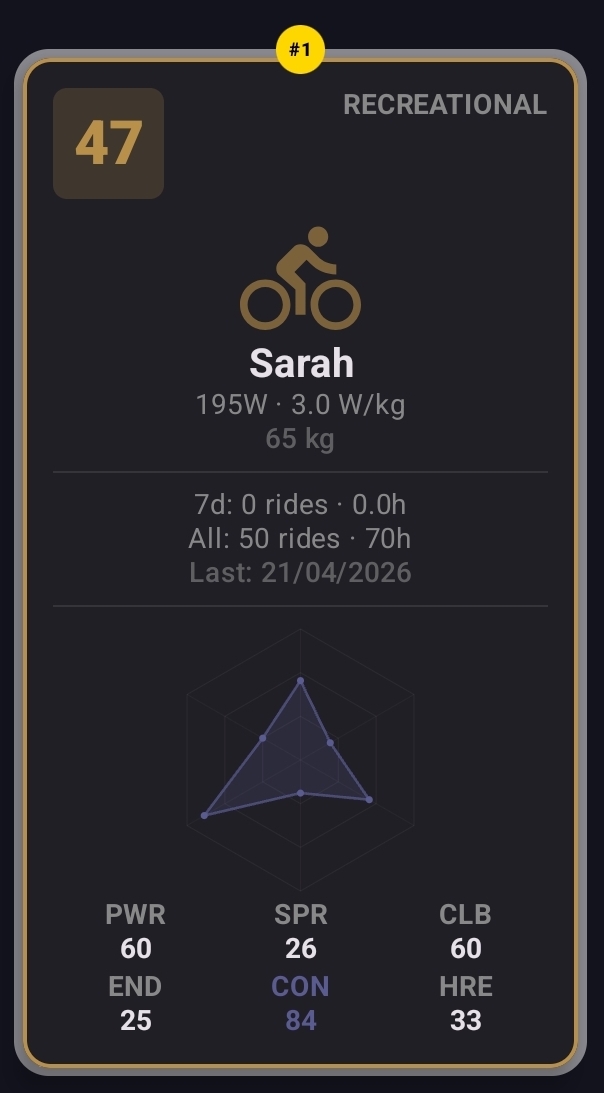
The portrait-style card that represents each rider appears in two places: the User Selection screen (the row of all riders on the device) and the Workout Selection screen (the active rider's card next to the workout list). It's the at-a-glance summary of who you are and how recently you've been riding.
Every card shows:
- Name — the rider's display name.
- FTP and W/kg — for example "250 W · 3.4 W/kg" if weight is set.
- Weight — in kg or lb depending on the rider's preferred units.
- 7-day stats — rides and hours over the last 7 days.
- All-time stats — total rides and total hours since the rider was created.
- Last ride date — useful to spot riders who haven't been on the bike in a while.
Riders who haven't yet completed five sessions see this stats panel only. After five sessions the card unlocks the rating panel — see the next section.
Rider ratings — the radar chart
Once a rider has completed at least five sessions, the rider card surfaces a six-axis radar chart, an overall rating, and a band label. The shape of the radar is the visual fingerprint of how the rider rides; the overall rating compresses it to a single 0–99 number for sorting and comparison.
The six attributes
Each axis is rated 0–99 against pro-cyclist reference data, with anchor points calibrated so a recreational rider sits around 30, a competitive amateur around 50, an elite amateur around 70, a pro around 85, and the very top of the sport around 95+.
| Attribute | Long form | What it measures |
|---|---|---|
| PWR | Power | Sustained threshold ability — your FTP relative to body weight (W/kg). The single most-weighted axis in the overall rating. |
| SPR | Sprint | Short explosive power — 5-second peak in W/kg. |
| CLB | Climbing | Ability on sustained climbs. Rated on the same scale as PWR (FTP W/kg), since sustained power is what climbing rewards. |
| END | Endurance | Capacity for long efforts — composite of weekly training load. |
| CON | Consistency | Steadiness of power output during structured efforts. Steady riders score higher than ones whose power swings around the target. |
| HRE | HR Efficiency | Power per heartbeat (W/bpm). A higher number means the same wattage is produced at a lower heart rate. Requires HRM data; rides without an HRM don't contribute. |
Overall rating and band
The overall rating in the top-left of the card is a 0–99 number — a weighted blend of the six attribute ratings, with PWR carrying the most weight, then CLB and END, then SPR, then CON and HRE. Riders with no HRM data have HRE excluded and the other weights rebalanced.
The band label sits in the top-right, derived from the overall rating:
- Beginner — under 30
- Recreational — 30–49
- Competitive — 50–69
- Elite Amateur — 70–84
- Professional — 85–94
- World Class — 95+
Family Leaderboard
The User Selection screen header swaps to Family Leaderboard when the household has more than one rider. The cards can be sorted by:
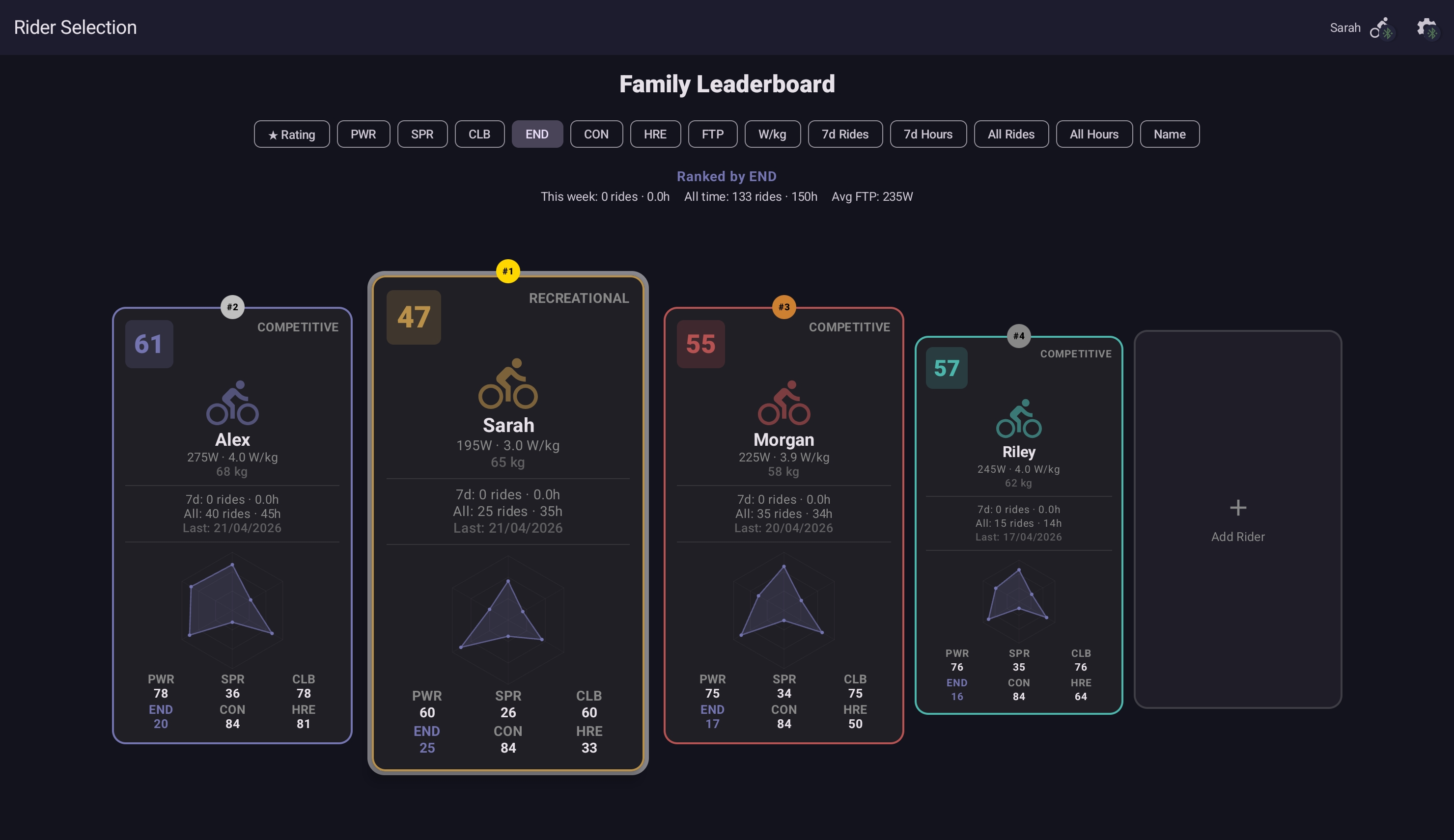
- All Rides — total session count.
- All Hours — total ride time.
- Name — alphabetical.
- Recent — most-recently-active first.
- Or by individual attribute — tap the chip for PWR, SPR, CLB, END, CON, or HRE to rank by that axis. The matching attribute on each card highlights as you sort.
The top three positions on the active sort get a podium badge — gold, silver, bronze — over the card's top edge.
Family ghosts on routes
On routes, every rider's personal best is replayed as a ghost the next time someone rides the route. With multiple riders on the device, the cockpit can show every household member's ghost on the same terrain — race your partner's PB on a route they rode last week, without needing both of you on bikes at once. See Personal Bests & Ghost Rider → family ghosts for the cockpit details.
Per-rider data and backup
Each rider's data is independent. Backing up one rider gives you that one rider's complete picture; backing up the device gives you everyone's. The full picture lives in the glossary entries:
- Per-rider export — Profile → Export My Data writes a
.ytrider.json.gzfile for the active rider. - Device backup — Settings → Data → Export Device Backup writes a
.ytbackup.json.gzfile with every rider's profile, sessions, personal bests, favourites, and custom workouts.
Either file restores via Settings → Data → Import Backup, with merge or overwrite handling on collisions for device backups, and a conflict-detection dialog for rider files (add as new, merge into existing rider with the same data origin, or rename on a name collision).
Deleting a rider from the User Selection screen removes that rider's profile, history, and personal bests permanently. The other riders on the device are unaffected.
Multi-rider needs the Family tier
The free and Pro tiers support a single rider profile. The Family tier unlocks up to five rider profiles, per-rider stats and history, family ghost laps, the family leaderboard, and per-rider Strava and device preferences. See the in-app upgrade screen (Settings → Subscription) for current pricing.